
How to Create Custom Tweet Tones for Your Brand (Step-by-Step)
Learn to create custom tweet tones that match your brand personality. Step-by-step guide to setting up AI-powered tone presets for consistent Twitter
Good boy is learning everything from build product and sell, marketing:
Your brand voice is your fingerprint on Twitter. Without consistent custom tweet tones, your content blends into the noise of millions of daily posts. Whether you're witty and bold or professional and trustworthy, your audience should recognize your voice instantly.
This guide walks you through creating custom tweet tones that capture your unique brand voice. You'll learn how to use AI content personalization to maintain consistency across every post—without spending hours crafting each tweet manually.
Why Consistent Brand Tone Matters on Twitter
Think about the brands you follow on X/Twitter. What makes their content instantly recognizable? It's their tweet style—the specific way they communicate that feels uniquely theirs.
Consistency in brand voice Twitter delivers measurable results:
Recognition: Followers identify your content before seeing your handle
Trust: Predictable communication builds audience confidence
Engagement: Authentic voices attract more interactions than generic posts
Loyalty: People connect with personalities, not faceless brands
A 2025 Sprout Social study found that 64% of consumers want brands to connect with them authentically. Your tone is how you demonstrate that authenticity at scale.
Understanding Different Tweet Tones
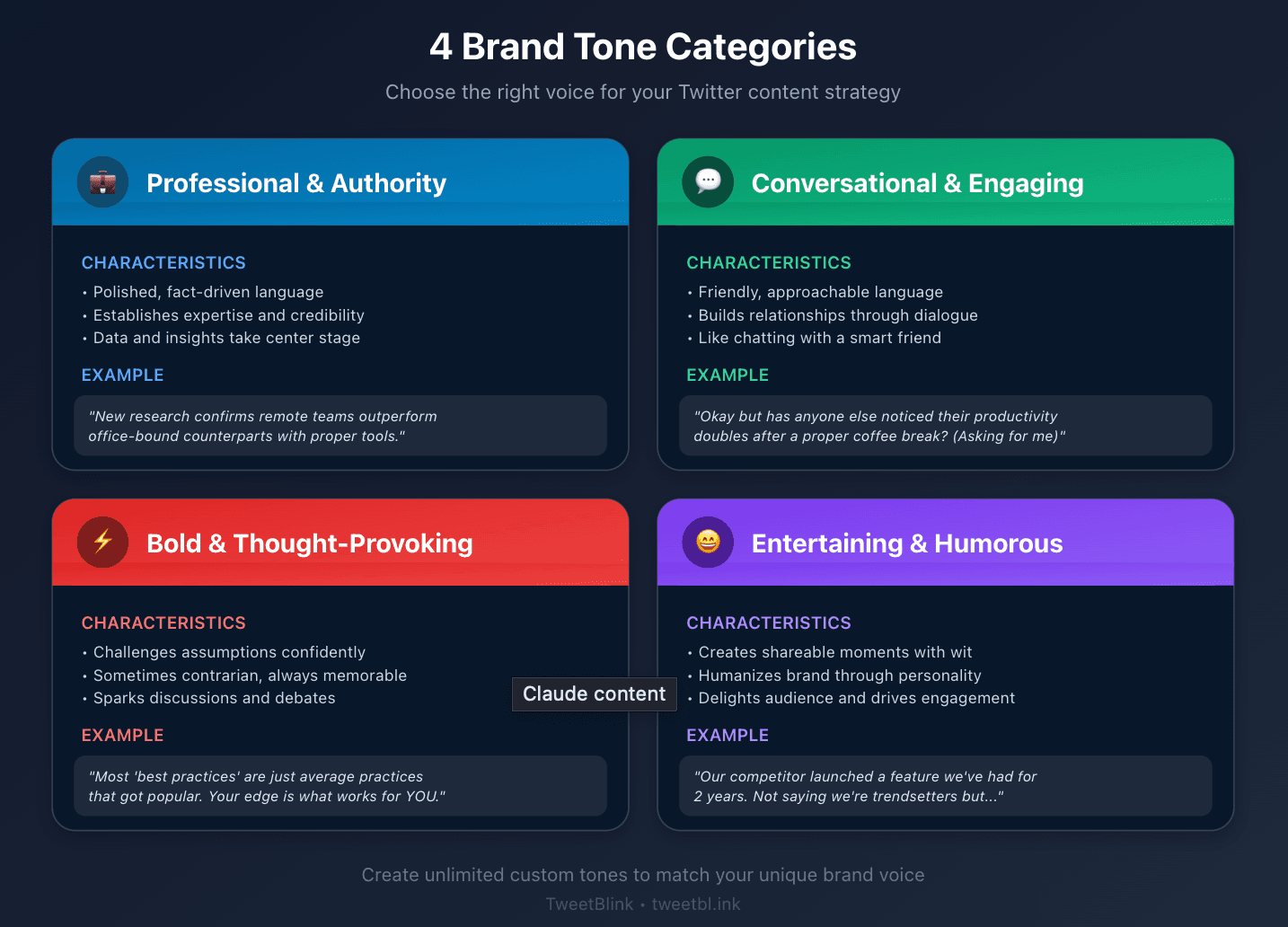
Before creating custom tweet tones, you need to understand the building blocks. Tweet tones fall into several strategic categories:
Professional and Authority Tones
These establish expertise and credibility. Think industry leaders sharing insights. The language is polished but accessible. Facts take center stage.
Example: "New research confirms what we've observed: remote teams outperform office-bound counterparts when given proper tools and autonomy."
Conversational and Engaging Tones
These build relationships through friendly, approachable language. They feel like chatting with a knowledgeable friend rather than receiving a corporate broadcast.
Example: "Okay but has anyone else noticed their productivity doubles after a proper coffee break? Asking for a friend (me, I'm the friend)."
Bold and Thought-Provoking Tones
These challenge assumptions and spark discussions. They're confident, sometimes contrarian, and always memorable.
Example: "Unpopular opinion: Most 'best practices' are just average practices that got popular. Your edge comes from what works for YOUR audience."
Entertaining and Humorous Tones
These create shareable moments through wit and personality. They humanize your brand and make followers smile.
Example: "Our competitor just launched a feature we've had for two years. We're not saying we're trendsetters, but... okay yes we're saying exactly that."
How to Identify Your Brand Voice
Before you can create custom tweet tones, you need clarity on what your brand actually sounds like. Here's a proven process:
Step 1: Audit Your Best Content
Look at your top-performing posts from the past year. What patterns emerge? Note:
Word choices you frequently use
Sentence lengths that work
Emojis or formatting habits
Topics that resonate most
Step 2: Define Three Core Characteristics
Describe your brand in three adjectives. Be specific. "Professional" is vague. "Confident-but-humble industry expert" tells a story.
Examples of brand characteristic sets:
Tech startup: Innovative, accessible, irreverent
Financial advisor: Trustworthy, clear, empowering
Fitness brand: Motivating, no-nonsense, supportive
Step 3: Create Voice Boundaries
What would your brand never say? Boundaries define your voice as much as what you do say.
Never condescending
Never uses jargon without explanation
Never posts without adding value
Never negative about competitors directly
Step-by-Step: Creating Custom Tones in TweetBlink
Now let's turn your brand voice into actionable custom tweet tones using TweetBlink's AI-powered tone creation feature.
Step 1: Access Custom Tone Builder
Navigate to the Custom Tones section in TweetBlink. You'll find two tabs:
Create Tone: Where new tones are born
My Tones: Your saved tone library
Step 2: Describe Your Desired Tone
This is where AI content personalization begins. In the description field, explain your tone in natural language. The more detail you provide, the better the AI understands your vision.
Effective description example:
"I want a confident but approachable tone for a SaaS startup. Use clear, jargon-free language. Include occasional dry humor. Keep sentences punchy—mostly under 15 words. Sound like a smart friend giving advice, not a corporation issuing statements. Avoid exclamation points and excessive enthusiasm. Be helpful without being preachy."
Weak description example:
"Professional and friendly tone."
See the difference? Specificity drives results.
Step 3: Generate and Review
Click generate and let TweetBlink's AI analyze your description. The system creates:
A tone title
Comprehensive characteristics
Visual icon representation
Review the generated tone carefully. Does it capture what you described? The preview shows exactly how the AI interpreted your input.
Step 4: Refine Before Saving
Before saving, you can edit any component. Perhaps the AI captured your humor but missed your brevity preference. Adjust the description to include those nuances.
Step 5: Set as Default (Optional)
If this tone represents your primary brand voice, set it as your default. Every new tweet generation session will automatically use this tone, ensuring consistent brand voice Twitter presence.
Examples of Effective Brand Tones
Let's examine real-world custom tweet tones that work:
The Educator Tone
Description: "Helpful and informative without being condescending. Shares knowledge generously. Uses analogies to explain complex topics. Patient tone. Celebrates learning. Asks questions to engage readers. No jargon without explanation."
Generated tweet style:
"Think of your email list like a garden. You can't just plant seeds and disappear. Water consistently (valuable content), pull weeds (remove inactive subscribers), and celebrate when things bloom (engagement!). What's growing in your garden this week?"
The Industry Insider Tone
Description: "Confident expert sharing behind-the-scenes knowledge. Casual but authoritative. Uses industry terminology appropriately. Occasionally contrarian. Values truth over popularity. Direct communication style. No fluff or filler."
Generated tweet style:
"Most 'viral' posts aren't accidents. They're engineered. The pattern: Hook in 7 words, insight in under 50, clear takeaway. Study what works, then make it yours."
The Supportive Coach Tone
Description: "Encouraging and motivating without toxic positivity. Acknowledges struggles while focusing on solutions. Uses 'you' language to speak directly. Celebrates small wins. Never dismissive of challenges. Warm but not soft."
Generated tweet style:
"Starting over isn't failure—it's data collection. Every 'unsuccessful' attempt taught you something. List three things you learned from your last setback. Those lessons become your edge."
Testing and Refining Your Custom Tones
Creating a custom tweet tone is just the beginning. Refinement makes it powerful.
Generate Test Content
After creating your tone, generate 5-10 tweets on different topics. This reveals how the tone performs across various subjects. Watch for:
Consistency in voice
Natural language flow
Alignment with your brand values
Engagement potential
Compare Against Your Best Posts
Place AI-generated tweets next to your historically top-performing content. They should feel like they belong together—same family, similar energy.
Iterate Based on Results
Post your tone-generated tweets and track engagement. If certain phrase patterns underperform, update your tone description. AI content personalization improves with feedback.
Using Multiple Tones Strategically
Many brands need more than one voice. TweetBlink allows unlimited custom tweet tones for different contexts:
Content Type Variations
Educational content: Thoughtful, clear, helpful
Promotional content: Confident, value-focused, direct
Community engagement: Conversational, warm, responsive
Industry commentary: Authoritative, analytical, balanced
Audience Segment Tones
B2B audience: Professional, data-driven, solution-oriented
Consumer audience: Relatable, benefit-focused, accessible
Developer audience: Technical, precise, no-nonsense
Platform Context Tones
Even within X/Twitter, context shifts. Replies might use a more casual tone than original posts. Threads might be more educational. Quote tweets might be wittier.
Create custom tones for each context and switch seamlessly.
Pro Tips for Brand Tone Consistency
After creating your custom tweet tones, maintain consistency with these practices:
Document Everything
Keep a brand voice guide that includes:
Your core custom tone descriptions
Examples of on-brand and off-brand content
Specific words or phrases you always/never use
Response templates for common situations
Leverage Style Memory
TweetBlink's Style Analysis feature learns from tweets you bookmark. When you generate content you love, bookmark it. The AI studies patterns and improves future generations automatically.
Review Weekly
Spend 15 minutes weekly reviewing your tone-generated content. Are tweets landing? Does anything feel off-brand? Refine your custom tones based on real performance data.
Train Your Team
If multiple people manage your account, ensure everyone understands the custom tones. Shared tools like TweetBlink mean everyone generates brand-consistent content regardless of who's posting.
Common Tone Creation Mistakes to Avoid
Learn from others' missteps:
Vague descriptions: "Friendly and professional" tells the AI almost nothing. Be specific about how friendly and what kind of professional.
Conflicting characteristics: "Formal but casual, serious but funny" confuses the AI. Pick a lane, then add nuance.
Ignoring your audience: Your tone should resonate with your followers, not just reflect what you think sounds good.
Set and forget: Tones need maintenance. As your brand evolves, your custom tones should too.
Start Creating Your Brand's Voice Today
Your tweet style shouldn't be an accident. With custom tweet tones, you transform brand voice Twitter from hopeful consistency to guaranteed alignment.
The process is straightforward: identify your voice, describe it clearly, generate your tone, and refine based on results. TweetBlink handles the AI content personalization—you provide the vision.
Start with your primary brand voice. Create one custom tone that captures your essential character. Use it for a week. Observe results. Iterate.
Then expand. Build your library of tones for different contexts, audiences, and content types. Every tweet becomes an opportunity to reinforce what makes your brand uniquely recognizable.
Your audience is waiting to hear your voice. Now they'll hear it consistently, authentically, and at scale.
Ready to create your first custom tweet tone? Get started with TweetBlink and transform your Twitter content strategy today.